Automating ConnectWise Agreement Invoice Comparison to Catch Billing Changes
Overview
Most of your agreement invoices change every month, and nobody touches them. Microsoft 365 licenses, telephony lines, backup seats and other subscriptions updated by integrations like Pax8 are synced into agreement additions, so the quantity moves on its own. These ups and downs are expected, but huge swings often require a closer look to make sure billing is accurate.
In this post I’ll go over some ideas for quickly comparing ConnectWise PSA agreement current invoices against previous ones, what to flag, and two ways to build that check yourself (SQL and the API). We also include a dashboard for this in our hosted reports if you would rather not build and maintain it.
What You’re Looking For
Comparing invoice totals is the easy part. The useful part is deciding what counts as a difference worth a person’s time. These are the cases that matter in practice:
- Big swings. An agreement’s invoice moved up or down by more than a set percentage from the month before. 5% is a good yellow flag and 10% a good red one. These are usually integration-driven quantities (licenses, lines, seats) that changed for a real reason, such as a hire or a departure, or for a bad one, such as a sync error.
- New or stopped agreements. An agreement that has an invoice this month and none last month (or the reverse). Sometimes that is expected. Sometimes a cancellation never made it to billing.
- Hidden line-item changes. This is the one totals can’t show you. One product goes up $300 and another goes down $290, and the invoice total barely moves. Nobody notices, but something was changed and it may not have been on purpose.
- Catalog renames. A product description was renamed and now looks like a removed line plus an added line. The same quantity and the same dollars should be ignored, or you will chase noise.
The Comparison Itself
The logic is the same however you build it. For each billing agreement, keep its few most recent invoices (the current one plus the three before it works well, and covers a missed month), then line up the products by agreement and description and compare quantity and extended price.
Two choices make it accurate. Rank by invoice date per agreement, not by calendar month, so an agreement that skipped a month still compares to its real previous invoice. And ignore lines at $0, which are usually notes or included items and just add clutter.
Option 1: SQL
If you have SQL access to your ConnectWise database (an on-premise partner, or the read-only Cloud Data Access), the reporting views already have what you need: v_rpt_Invoices for the invoices, v_rpt_Product for the billed lines, and v_rpt_AgreementList for agreement status and parent agreements. The query below ranks each agreement’s invoices by date and compares the newest one to the one before it.
-- One row per agreement: newest invoice vs the one before it
WITH inv AS (
  SELECT i.Company_Name, i.Agreement_Name, i.AGR_Header_RecID, i.Invoice_Number,
         i.Billing_Log_RecID, i.Date_Invoice, a.Agreement_Status,
         ROW_NUMBER() OVER (PARTITION BY i.AGR_Header_RecID
                            ORDER BY i.Date_Invoice DESC, i.Billing_Log_RecID DESC) AS rn
  FROM v_rpt_Invoices i
  JOIN v_rpt_AgreementList a ON a.AGR_Header_RecID = i.AGR_Header_RecID
  WHERE i.Invoice_Type = 'Agreement'
    AND i.Date_Invoice >= DATEADD(month, -4, GETDATE())
    AND a.Parent_Agreement_RecID IS NULL            -- bill at the parent agreement only
), amt AS (
  SELECT inv.*, SUM(p.Extended_Price_Amount) AS invoice_amount
  FROM inv
  LEFT JOIN v_rpt_Product p
         ON p.billing_log_recid = inv.Billing_Log_RecID
        AND p.unit_price > 0                      -- skip $0 lines
  WHERE inv.rn <= 2
  GROUP BY inv.Company_Name, inv.Agreement_Name, inv.AGR_Header_RecID, inv.Invoice_Number,
           inv.Billing_Log_RecID, inv.Date_Invoice, inv.Agreement_Status, inv.rn
)
SELECT Company_Name AS Company, Agreement_Name, Agreement_Status,
       SUM(CASE WHEN rn = 1 THEN invoice_amount ELSE 0 END) AS Current_Invoice,
       SUM(CASE WHEN rn = 2 THEN invoice_amount ELSE 0 END) AS Prior_Invoice,
       SUM(CASE WHEN rn = 1 THEN invoice_amount ELSE 0 END)
         - SUM(CASE WHEN rn = 2 THEN invoice_amount ELSE 0 END) AS Dollar_Delta,
       (SUM(CASE WHEN rn = 1 THEN invoice_amount ELSE 0 END)
         - SUM(CASE WHEN rn = 2 THEN invoice_amount ELSE 0 END))
         / NULLIF(SUM(CASE WHEN rn = 2 THEN invoice_amount ELSE 0 END), 0) AS Pct_Delta
FROM amt
GROUP BY Company_Name, Agreement_Name, Agreement_Status
ORDER BY ABS(COALESCE(
         (SUM(CASE WHEN rn = 1 THEN invoice_amount ELSE 0 END)
          - SUM(CASE WHEN rn = 2 THEN invoice_amount ELSE 0 END))
          / NULLIF(SUM(CASE WHEN rn = 2 THEN invoice_amount ELSE 0 END), 0), 1)) DESC;
That gets you the swings. To find the hidden changes, go one level down to the product lines and compare quantity and price per item. The same ranking works. Swap the final SELECT for a join back to v_rpt_Product grouped by item_desc, then keep only the lines that moved while the agreement total stayed nearly flat:
-- Lines (by item) that changed while the agreement total barely moved
, lines AS (
  SELECT inv.Company_Name, inv.Agreement_Name, inv.AGR_Header_RecID, p.item_desc,
         SUM(CASE WHEN inv.rn = 1 THEN p.Quantity ELSE 0 END)              AS cur_qty,
         SUM(CASE WHEN inv.rn = 2 THEN p.Quantity ELSE 0 END)              AS prior_qty,
         SUM(CASE WHEN inv.rn = 1 THEN p.Extended_Price_Amount ELSE 0 END) AS cur_amt,
         SUM(CASE WHEN inv.rn = 2 THEN p.Extended_Price_Amount ELSE 0 END) AS prior_amt
  FROM inv
  JOIN v_rpt_Product p ON p.billing_log_recid = inv.Billing_Log_RecID AND p.unit_price > 0
  WHERE inv.rn <= 2
  GROUP BY inv.Company_Name, inv.Agreement_Name, inv.AGR_Header_RecID, p.item_desc
), agr AS (
  SELECT AGR_Header_RecID, SUM(cur_amt) AS cur_total, SUM(prior_amt) AS prior_total
  FROM lines GROUP BY AGR_Header_RecID
)
SELECT l.Company_Name, l.Agreement_Name, l.item_desc,
       l.prior_qty, l.cur_qty, l.prior_amt, l.cur_amt
FROM lines l
JOIN agr a ON a.AGR_Header_RecID = l.AGR_Header_RecID
WHERE ABS(l.cur_amt - l.prior_amt) >= 25                                  -- at least $25 on the line
  AND ABS(a.cur_total - a.prior_total) < 0.05 * NULLIF(a.prior_total, 0)  -- agreement total moved under 5%
ORDER BY ABS(l.cur_amt - l.prior_amt) DESC;
Run the second block by pasting it after the inv CTE in the first query, in place of the amt CTE and final SELECT. Two things to watch. Keep the unit_price > 0 filter on both sides so $0 notes don’t show up as changes. And add your own rule for renames (same quantity and amount under a new description), or a catalog rename will look like one line removed and another added.
This is a good fit for Power BI or a scheduled email, since the data is right there. The limit is that cloud partners without Cloud Data Access can’t run it without setting up an on-premise gateway. If that isn’t an option, the API is the way in.
Option 2: The ConnectWise API
The same data is available through the REST API. You list the Agreement-type invoices, then fetch the product lines for each one. Here’s the shape of it in JavaScript:
const base = 'https://api-na.myconnectwise.net/v4_6_release/apis/3.0/';
const headers = {
  clientId: process.env.CW_CLIENT_ID,
  Authorization: 'Basic ' + process.env.CW_AUTH   // base64 of companyId+publicKey:privateKey
};

// 1. Agreement invoices from the last few months (start of the month, 4 months back)
const now = new Date();
const since = new Date(now.getFullYear(), now.getMonth() - 4, 1).toISOString().slice(0, 10);
const invoices = [];
for (let page = 1; page <= 20; page++) {
  const conditions = encodeURIComponent(`type="Agreement" AND date>=[${since}]`);
  const batch = await (await fetch(
    `${base}finance/invoices?conditions=${conditions}&page=${page}&pageSize=200`, { headers })).json();
  invoices.push(...batch);
  if (batch.length < 200) break;
}

// 2. Keep the 4 most recent invoices per agreement, ranked by invoice date
const byAgreement = {};
for (const inv of invoices) {
  if (inv.agreement?.id) (byAgreement[inv.agreement.id] ||= []).push(inv);
}
const kept = [];
for (const list of Object.values(byAgreement)) {
  list.sort((a, b) => new Date(b.date) - new Date(a.date))
      .slice(0, 4)
      .forEach((inv, i) => kept.push({ inv, rank: i + 1 }));
}

// 3. Product lines for each kept invoice
const lines = [];
for (const { inv, rank } of kept) {
  const url = `${base}procurement/products?conditions=invoice/id=${inv.id}&pageSize=1000`;
  const products = await (await fetch(url, { headers })).json();
  for (const p of products) {
    if (!(p.price > 0)) continue;   // skip $0 lines
    lines.push({
      company: inv.company.name, agreement_id: inv.agreement.id, invoice_rank: rank,
      item_description: p.description, quantity: p.quantity, ext_price: p.extPrice
    });
  }
}
// From here, group by agreement + item_description and compare rank 1 to rank 2.
That is the working core. A real version needs more around it:
- Rate limits. This makes one call per invoice for products. At a few hundred agreements you will hit ConnectWise’s 429 limit, so it needs to wait as long as ConnectWise says and retry, with a cap on total calls.
- Only refetch what changed. Compare each invoice’s
_info/lastUpdatedto what you stored last time and skip the unchanged ones. - Agreement status. A cancelled agreement should show as cancelled, not as a mystery drop to zero. That is another lookup per agreement.
- Permissions. The API member needs read access to Finance invoices and agreements, plus Procurement products. See setting up a ConnectWise API member for the minimal set.
- Somewhere to run it and look at it. A schedule, a database to hold the history, and a page you can sort and filter.
Or Skip the Build
Realistically, most MSPs are not going to maintain this. The ranking, the caching, the retry handling and the dashboard are a project, and the whole point is a few minutes of review at the start of the month.
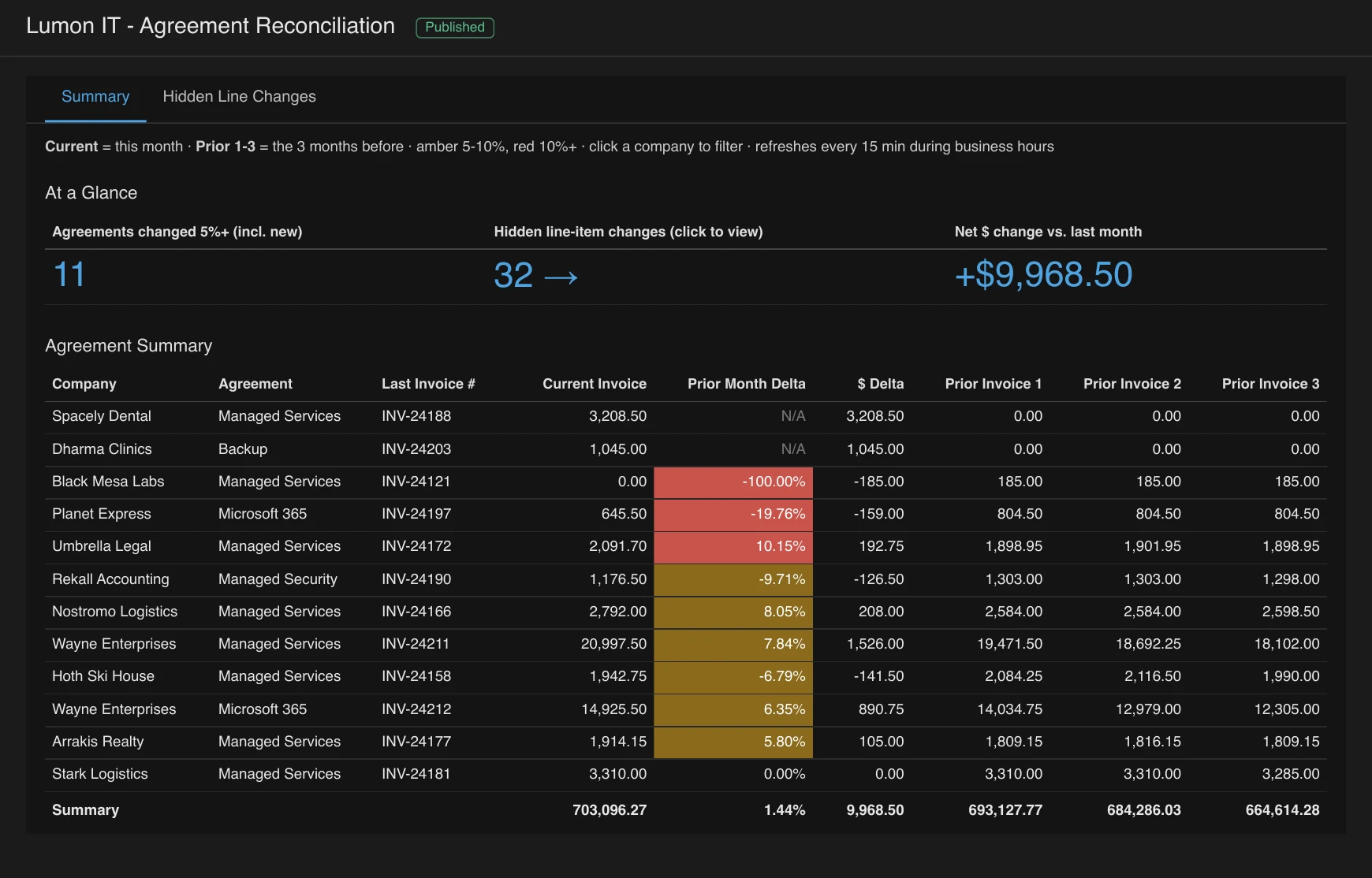
The Agreement Reconciliation report in NexNow Reports is this comparison, already built. Each agreement’s current invoice sits next to the three before it. Changes of 5% or more are amber and 10% or more are red. New and stopped agreements are called out. A second tab lists the hidden line-item changes (10% and at least $25 on a line, while the agreement total moved less than 5%), with catalog renames ignored. It refreshes through the day, so a fix you make in ConnectWise shows up quickly.
You can try it live on demo data without signing up.
Agreement Reconciliation is included with NexNow Reports, which is $75 per month, or $50 per month if you are also a NexNow hosted invoice client.
Getting Started
If you’d like to see it on your own agreements, book a reports demo. All we need is a read-only API member (the steps are in the API member post), and we can usually show you your own numbers on the call. If you would rather build it yourself, the SQL and code above should get you most of the way.