Do You Really Need That Workflow to Be an AI Prompt?
We recently read an MSP’s AI prompt for QA on closed tickets. It was a good prompt. Clear steps, clear output, and the team had clearly put real thought into it. It told the AI to pull the ticket, its notes and its time entries, then check seven things before closing it or sending it back for review.
Four of those seven checks were:
- Is any time entry over X hours?
- Is billable time logged against an internal work type?
- Do any of one tech’s entries overlap?
- Was the ticket closed with no time on it at all?
None of those need AI. They’re rules, and each has a right answer. A few lines of script would get them right every time, instantly, for free. A language model will get them right most of the time, at a cost per ticket, and now and then will answer a yes-or-no question wrong with complete confidence.
This isn’t an anti-AI post. We use AI every day. But “the AI handles it” has become the default answer to every automation question, and a lot of workflows that should be scripts are being written as prompts.
The test: does this step have a right answer?
Before you write a step as a prompt, ask three questions:
- Should the same input always give the same output? If a ticket with an 8-hour entry should be flagged today, it should be flagged tomorrow too.
- Can you write out a simple rule? “Flag billable time on internal work types” is a rule. “Flag tickets where the client still seems unhappy” is not.
- Would a confident wrong answer, 1 time in 50, be OK? For drafting a summary, probably yes. For billing, or for closing a ticket, probably not.
If the answers are yes, yes and no, it’s a script. What’s left is where AI is genuinely better than anything you could write by hand: Is this ticket spam? Does the client’s last reply say the problem is back? Is this resolution note good enough to send?
What a prompt-as-workflow really costs
- You can’t see why. A script that flags an entry can tell you exactly which rule it broke. A prompt gives you an answer and a plausible-sounding reason, which isn’t the same thing.
- It’s not repeatable. Run the same ticket twice and you can get two answers. That makes it hard to trust, and harder to test.
- It drifts. When the model behind it is updated, your workflow changes too, without a single edit on your side.
- It costs more and runs slower. That’s small per ticket, but real across thousands of tickets a month. A rule costs nothing to run.
- It’s easy to over-trust. Once a prompt is “doing QA,” people stop checking. That’s the real risk.
Here’s the same check both ways
As a prompt step
Review each time entry on the ticket. If any single
entry is longer than 6 hours, note it as a QA issue,
unless the work type suggests on-site or project
work where long entries are expected. Include the
entry date and member in your note.
As a script
const longEntries = entries.filter(e =>
  e.actualHours > 6 &&
  !onsiteWorkTypes.includes(e.workType?.name));
The script version is cleaner, gives the same result every run, and the “unless” part is an explicit list you control, not the model’s guess about which work types “suggest” on-site work.
The pattern we use: script, then AI, then guardrails
The AI is still doing real work here, just a smaller and better-defined piece of it. That makes its answers easier to check, and much cheaper.
Then check the work, whoever did it
Whether a tech, a script or an AI touched a ticket, the result lands in the same place: your PSA, and eventually your invoices. So review the result, not the worker.
That’s why we built Time and Ticket Review as part of NexNow Reports. It runs a set of rules against ConnectWise time entries and tickets (billable time with no client-facing notes, long entries, missing configurations, client updates nobody answered and more), and each flag can be marked OK so it stays gone unless the entry changes. It doesn’t know or care whether a person or an AI wrote the note. It just catches the billable entry whose notes all went to Internal Analysis, or the ticket closed right after the client wrote “still broken.”
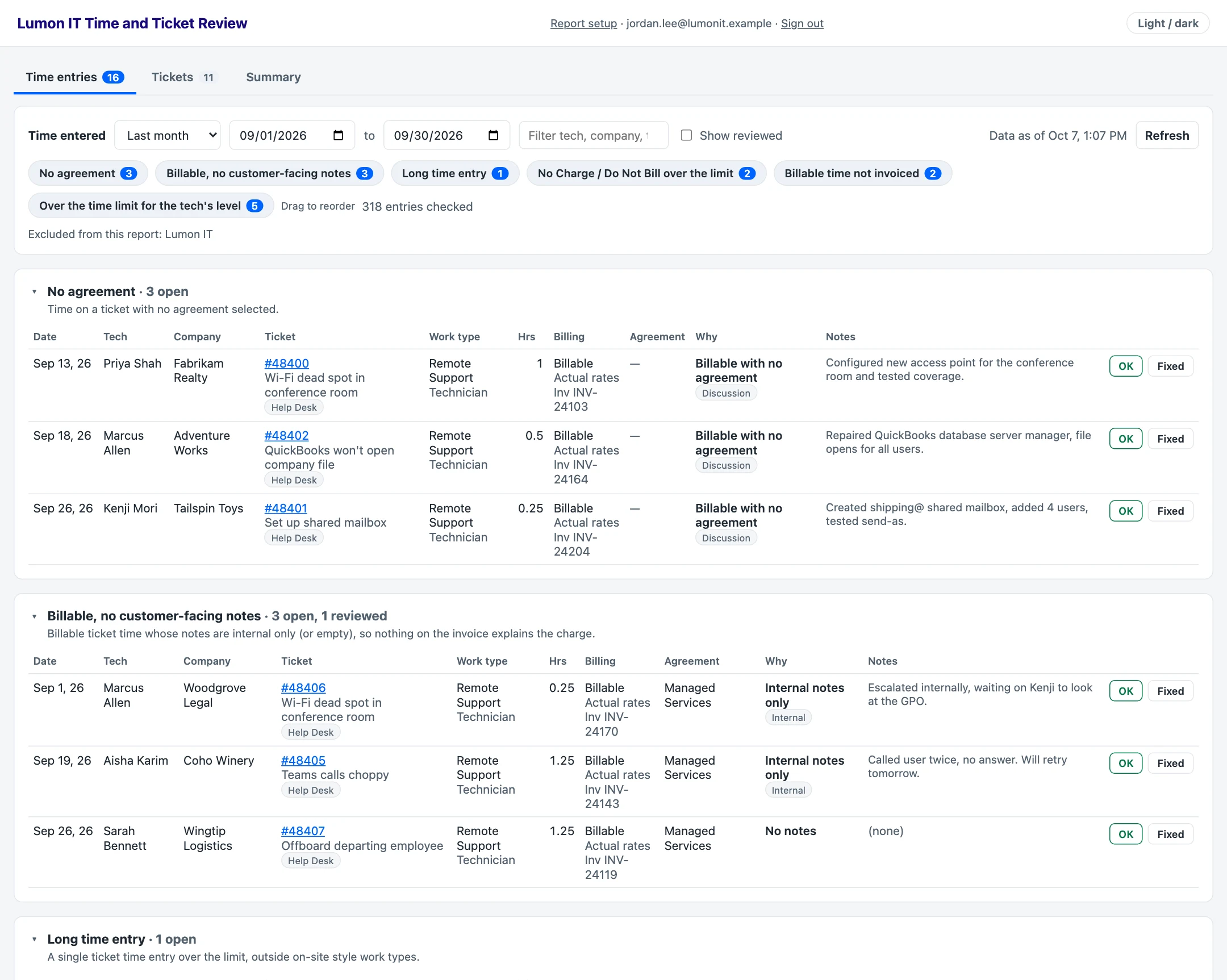
There’s a live demo with made-up data at app.nexnow.dev/demo.
Use AI. Just don’t hand it everything.
Nothing here is specific to ConnectWise. The same split works with Halo or any ticketing system or PSA, and any automation tool. Before your next workflow becomes a prompt, go through it step by step and ask which steps have a right answer. Script those. Give AI the rest. Then check the results either way.
If you’d like help sorting out which parts of a workflow should be AI and which should be plain automation, or want reports that check the work, book a time to talk.