
We’re excited to be working with your company.
In order to build the reports your firm has hired us to do, we’ll need to remotely access your ConnectWise server(s). The type of access we need is similar in nature and scope as what ConnectWise itself requires. Please read the following and then use the secure form below to send us the information requested.
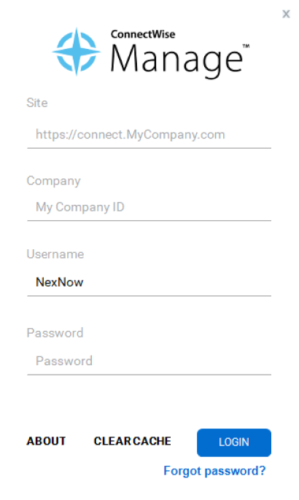
ConnectWise Manage
We need to know the following about your ConnectWise installation and environment:
- Site URL
- Company ID
- Username
- Password
- ConnectWise Web Server hostname (if you host your ConnectWise server)
- ConnectWise SQL Server hostname (if you host your ConnectWise server)
Your Site and Company ID can be found on your ConnectWise login screen.
For ConnectWise Self Hosted environments, we also need:
Remote Access
First, we’ll need to remotely access your ConnectWise server(s). Please provide the following information:
- Remote access type – Direct RDP (preferred)
- We will connect from this static IP address: 137.117.94.208 Please whitelist this address.
- Remote access hostname
- Remote access username and password
- Please ensure the user account we’re using to log in to your ConnectWise server(s) has the following permissions:
- Local server administrator rights (needed to manage SSRS)
- Remote logon rights (i.e. member of the local Remote Desktop Users security group)
- Administrator-level access to your ConnectWise SQL Server (sysadmin server role)
- This account should not regularly be used by somebody in your company or a third-party vendor.
Applications
Lastly, we’ll need to use the following applications to actually develop your reports. These can generally be installed on either of your ConnectWise servers, though we find clients generally prefer to make these applications available on their ConnectWise SQL server, when they have a 2-server configuration:
- ConnectWise desktop client (most recent version available)
- SQL Server Management Studio